Gantt charts have revolutionized the way project managers and teams plan, track, and manage their projects. By providing a visual representation of tasks, timelines, dependencies, deadlines, and team assignments, Gantt charts offer a comprehensive view of the project’s progress and status at any given time.
This article will delve into the intricacies of Gantt charts, exploring their benefits, components, creation process, and best practices for effective use.
What is a Gantt Chart?
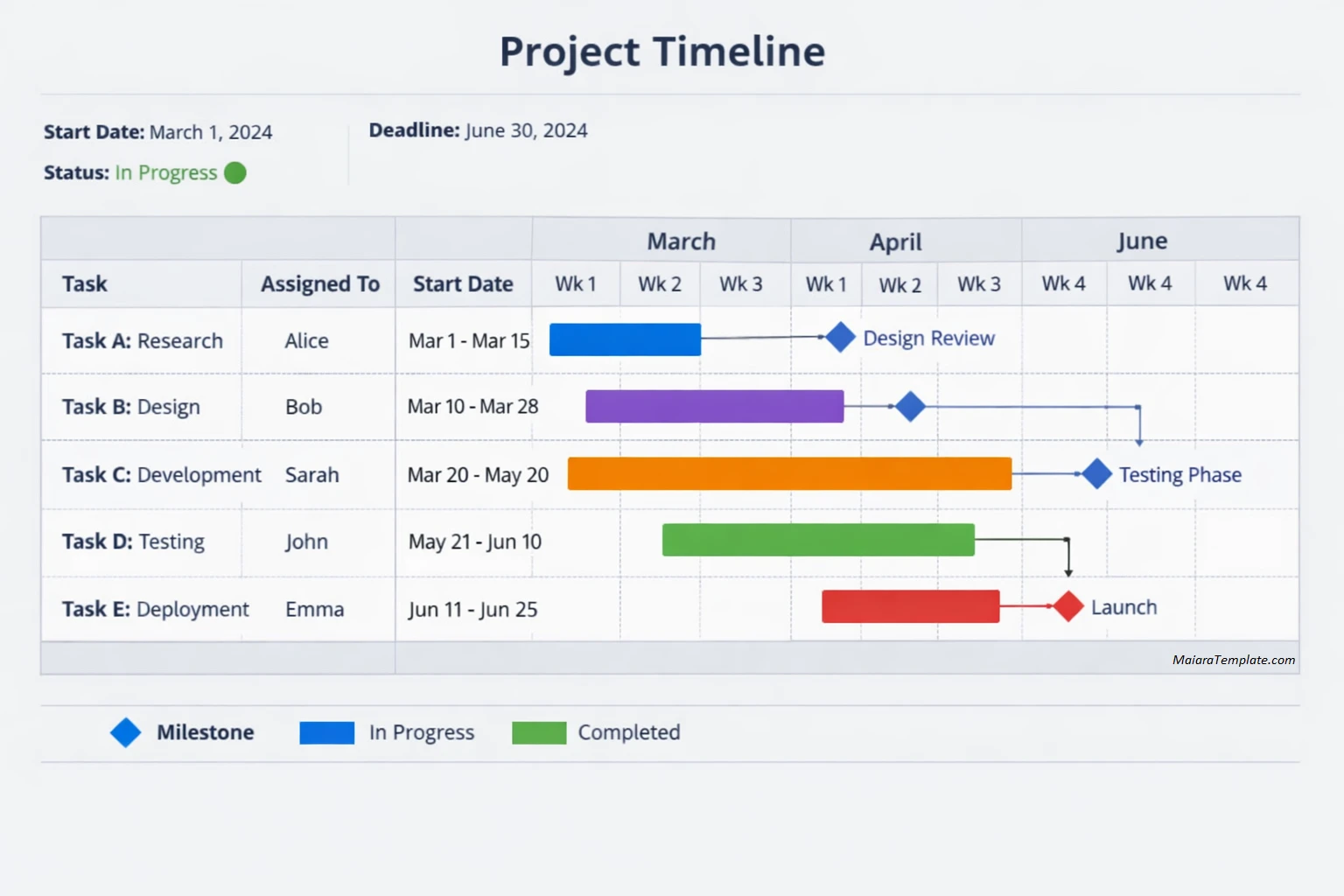
A Gantt chart is a powerful project management tool that displays tasks on a timeline, allowing project managers and team members to visualize the project schedule at a glance.
Each task is represented by a bar on the chart, with the length of the bar indicating the task duration. Tasks are arranged sequentially along the timeline based on their start and end dates, providing a clear roadmap for project completion.
Benefits of Using Gantt Charts
- Improved Planning: Gantt charts help project managers break down complex projects into manageable tasks, making it easier to plan and allocate resources efficiently.
- Enhanced Communication: The visual nature of Gantt charts simplifies project updates and status reports, enabling better communication with team members and stakeholders.
- Increased Efficiency: By providing a visual timeline of tasks and deadlines, Gantt charts help teams stay on track and meet project milestones effectively.
- Effective Resource Management: Gantt charts allow project managers to assign tasks to team members based on their skills and availability, optimizing resource utilization.
- Real-Time Tracking: With Gantt charts, project progress can be monitored in real-time, allowing for quick adjustments to be made to ensure project success.
What to Include in a Gantt Chart?
When creating a Gantt chart for your project, it is essential to include several key elements to ensure its effectiveness. These elements help provide a comprehensive overview of the project’s timeline, tasks, dependencies, and milestones, enabling efficient project management and tracking.
Tasks
The first step in creating a Gantt chart is to list all the tasks required to complete the project. Tasks should be broken down into specific and actionable items, making it easier to assign timelines and dependencies.
Task Duration
Specify the start and end dates for each task on the Gantt chart. This information allows team members to understand the duration of each task and plan their work accordingly.
Dependencies
Clearly define the relationships between tasks to show their dependencies. Identifying task dependencies ensures that work is completed in the correct sequence, preventing delays and bottlenecks in the project timeline.
Deadlines
Set deadlines for each task to establish clear expectations and ensure timely completion of work. Deadlines help team members prioritize their tasks and focus on critical activities to meet project milestones.
Assigned Team Members
Assign team members to specific tasks on the Gantt chart to clarify responsibilities and promote accountability. By assigning tasks to individuals, project managers can track progress and ensure that work is distributed evenly among team members.
How to Create a Gantt Chart
Creating a Gantt chart requires careful planning and organization to ensure that all project elements are accurately represented. Follow these steps to create a Gantt chart that effectively captures your project’s timeline, tasks, dependencies, and milestones.
Step 1: Identify Project Tasks
Begin by identifying all the tasks required to complete the project. Break down the project into smaller, manageable tasks that can be easily represented on the Gantt chart.
Step 2: Determine Task Sequence
Determine the sequence of tasks and their dependencies. Identify which tasks must be completed before others can start to create a logical order of work on the Gantt chart.
Step 3: Assign Start and End Dates
Assign start and end dates to each task on the Gantt chart. Establish realistic timelines for task completion, taking into account dependencies and resource availability.
Step 4: Use Project Management Software
Utilize project management software or online tools to create your Gantt chart. Many project management platforms offer Gantt chart features that simplify the process of creating and updating project schedules.
Step 5: Customize the Chart
Customize the Gantt chart by adding task bars, milestones, deadlines, and color-coding to enhance visibility and clarity. Tailor the chart to suit your project’s specific requirements and preferences.
Step 6: Share with Team Members
Share the Gantt chart with your team members and stakeholders to ensure alignment and understanding of project timelines and responsibilities. Encourage feedback and collaboration to foster a sense of ownership and engagement among team members.
Tips for Using Gantt Charts Effectively
To maximize the benefits of Gantt charts in your project management process, consider the following tips and best practices for creating and using Gantt charts effectively.
Regular Updates
Keep your Gantt chart updated with real-time progress and changes to ensure accurate tracking and visibility into project status. Regular updates help team members stay informed and aligned with project timelines.
Monitor Dependencies
Pay close attention to task dependencies on the Gantt chart to identify potential bottlenecks or delays in the project schedule. Addressing dependencies proactively can help mitigate risks and ensure smooth project execution.
Communicate Changes
Communicate any changes to the project timeline, task assignments, or deadlines promptly with team members and stakeholders. Clear communication helps manage expectations and allows for timely adjustments to project plans.
Set Milestones
Include milestones in your Gantt chart to mark significant achievements and track progress towards project goals. Milestones provide a sense of accomplishment and motivation for the team as they work towards project completion.
Use Color-Coding
Color-code tasks on the Gantt chart to differentiate between different types of tasks, priority levels, or team assignments. Color-coding enhances visual clarity and helps team members quickly identify critical tasks or areas that require attention.
Review Regularly
Schedule regular review meetings to discuss the project status, address any issues or roadblocks, and make necessary adjustments to the project plan. Regular reviews help keep the project on track and ensure timely completion.
Adjust as Needed
Be flexible with your Gantt chart and make adjustments as needed based on project changes, feedback from team members, or external factors. Adapting the Gantt chart to reflect real-time progress and challenges helps maintain project alignment and success.
By incorporating these tips and best practices into your project management approach, you can leverage the power of Gantt charts to visualize, track, and manage your projects effectively. Gantt charts serve as a valuable tool for project managers and teams seeking to streamline their project planning process, improve communication, and achieve successful project outcomes. Start using Gantt charts today and experience the benefits of enhanced project management and collaboration.
Free Gantt Chart Template
A Gantt Chart helps you visually plan and track project timelines, tasks, and dependencies in a clear and structured format. It provides an at-a-glance view of progress, deadlines, and responsibilities, making it easier to manage resources and stay on schedule. With a well-designed template, you can improve project coordination and ensure timely completion.
Download our Gantt Chart Template today to plan projects effectively and track progress with confidence.
Gantt Chart Template – DOWNLOAD

- Free Editable Nanny Agreement Template - April 9, 2026
- NDA Disclosure Agreement Template - April 8, 2026
- New Grad Nursing Resume Template - April 2, 2026
