A timesheet with work description is a time-tracking document that records how many hours an employee or contractor spends working and what tasks were completed during those hours. Unlike a basic timesheet that records only attendance or total hours, this format connects time spent with specific projects, assignments, and work activities.
Detailed time records can be useful for payroll processing, client billing, project costing, workload analysis, and resource planning. By documenting both hours and activities, businesses can gain a clearer understanding of how work time is actually being used.
A well-organized timesheet can also help employees remember what they worked on during the week and provide managers with useful information when reviewing project progress. Whether used by a small business, professional service provider, contractor, or larger organization, a detailed time tracking sheet can turn daily work activity into useful operational information.
What Is a Timesheet With Work Description?
A timesheet with work description is a structured record that combines time tracking with a written explanation of the work performed. It allows someone reviewing the document to see not only how many hours were worked, but also what those hours were spent doing.
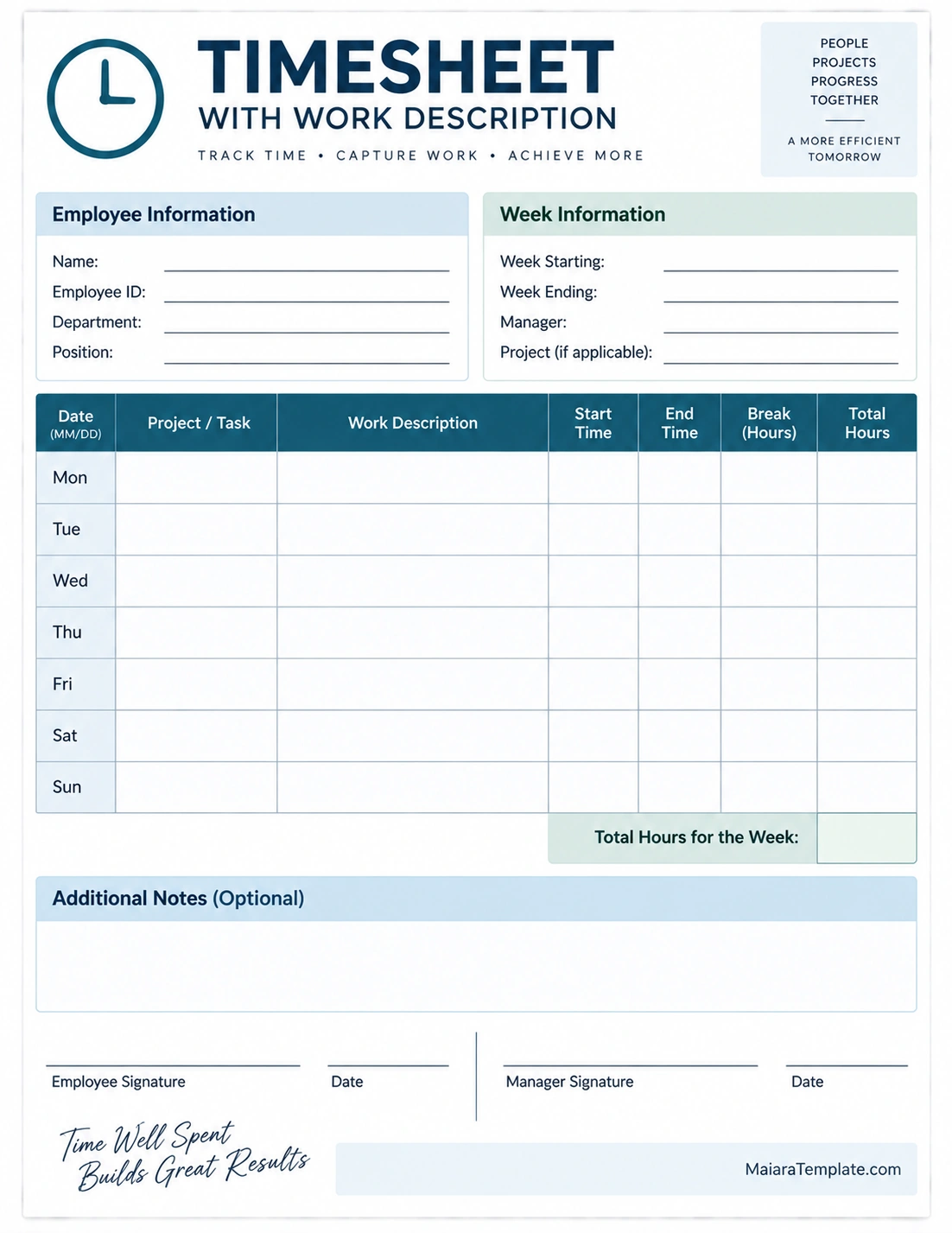
A typical timesheet may include the date, project or task, work description, start time, end time, break duration, and total hours. Additional sections can be used for employee information, project details, notes, approvals, and signatures.
This makes the document particularly useful when simply recording the number of hours is not enough. For example, a consultant might need to show how several hours were divided among research, client meetings, analysis, and report preparation.
Why Use a Timesheet With Work Description?
Detailed time tracking provides more information than a simple attendance record. When hours are connected to specific activities, businesses can better understand how time is allocated across projects and responsibilities.
- Supports accurate payroll: Recorded working hours can help payroll teams process compensation according to company procedures.
- Improves client billing: Billable hours can be connected to specific services or project activities.
- Tracks project costs: Labor hours can be associated with individual projects and tasks.
- Provides work visibility: Managers can see what activities are consuming time.
- Supports resource planning: Historical time data can help with future staffing and scheduling decisions.
- Documents completed work: Written descriptions create a useful record of activities performed.
- Improves productivity analysis: Time records can reveal recurring tasks, bottlenecks, and areas that may need attention.
What Should a Timesheet With Work Description Include?
The exact format can vary depending on the business and type of work, but several fields are commonly useful.
Employee Information
Include the employee’s name and, when relevant, employee ID, department, job title, or other identifying information. This makes it easier to associate the timesheet with the correct person.
Week or Reporting Period
Identify the period covered by the timesheet. A weekly timesheet is common, but some organizations may use biweekly, monthly, or project-specific reporting periods.
Date
Record the date associated with each work entry. This allows hours and activities to be connected to a specific working day.
Project or Task
The project or task field identifies where the time was spent. This is particularly useful for employees who work on multiple projects or for service providers who bill different clients.
Work Description
The work description is the defining feature of this type of timesheet. It should briefly explain what was actually completed during the recorded period.
Instead of writing “Worked on project,” a more useful description might be “Reviewed client requirements and updated the project specification document.” The goal is to provide enough detail to understand the activity without creating unnecessary administrative work.
Start and End Time
Recording start and end times provides a way to calculate the duration of each work period. Organizations may also choose to record only total hours, depending on their timekeeping system and requirements.
Break Hours
A break field can be used to record unpaid or other designated breaks when required by the organization’s procedures. The treatment of breaks should follow applicable workplace rules and company policy.
Total Hours
The total hours field records the amount of working time associated with the entry. A weekly total can then provide a summary of all recorded hours.
Notes and Approval
An optional notes section can capture additional information about the work. Signature or approval fields can be included when a supervisor, manager, or client needs to review the submitted timesheet.
How to Write a Good Work Description
The work description should be specific enough to explain the activity while remaining concise. A good description focuses on the actual work performed rather than vague statements about being busy.
Use Action-Oriented Descriptions
Start with an action that explains what was done. Words such as reviewed, prepared, analyzed, tested, designed, updated, contacted, documented, researched, or developed can make entries more informative.
Identify the Deliverable
When possible, mention the document, feature, report, meeting, analysis, or other output associated with the work.
Include Relevant Project Context
If the project or task column does not already provide enough context, briefly explain which client, project phase, or assignment the work relates to.
Keep It Concise
A work description does not need to become a detailed daily report. One clear sentence may be enough for a routine task, while a more complex activity may require a little additional detail.
Examples of Work Descriptions
Here are examples of descriptions that can make a timesheet more informative:
- Reviewed client requirements and documented requested changes.
- Prepared the first draft of the monthly project report.
- Tested website forms and documented technical issues.
- Updated project schedule and reviewed outstanding tasks.
- Analyzed sales data and prepared summary findings.
- Attended client meeting and recorded follow-up actions.
- Researched competitors and organized findings for the strategy report.
- Created presentation slides for the upcoming project review.
Timesheet With Work Description for Payroll
Timesheets are commonly used as part of internal timekeeping and payroll processes. A detailed record can help an organization determine the hours an employee reports for a particular pay period.
However, timesheet procedures should follow the employer’s payroll policies and applicable labor and recordkeeping requirements. A timesheet is a recordkeeping tool, not a substitute for understanding the rules that apply to a particular workplace.
Employees should record their time accurately and report corrections promptly when an error is discovered.
Timesheet With Work Description for Client Billing
Detailed time tracking can be especially useful for businesses that charge clients based on hours worked. Consultants, freelancers, attorneys, designers, developers, accountants, and other professionals may need to document billable activities.
A work description can help connect a billed time entry to a specific service or deliverable. For example, instead of simply reporting “3 hours,” a consultant could record the project, hours, and a concise description of the analysis or client work completed.
Businesses should clearly define which activities are billable and which are non-billable according to their client agreements.
Timesheet With Work Description for Project Management
Time data can provide useful information for project management. When employees record time against specific projects and tasks, managers can compare actual effort with project expectations.
This can help identify tasks that consistently take longer than expected, projects that require additional resources, or activities that may be candidates for process improvement.
Time tracking should be used as one source of project information rather than as the sole measure of employee performance. The nature and quality of work are also important considerations.
How to Fill Out a Timesheet With Work Description
A consistent routine can make time tracking easier and more accurate.
1. Record Time Promptly
Enter your time as soon as practical instead of waiting until the end of the week. Recent activities are generally easier to remember accurately.
2. Select the Correct Project
Make sure each entry is associated with the correct project, client, department, or task.
3. Describe the Work
Write a short description explaining what you accomplished. Focus on the activity or result rather than simply stating that you worked on something.
4. Record Breaks and Total Hours
Enter applicable break information and calculate the total working time according to the organization’s process.
5. Review the Timesheet
Before submitting the timesheet, check the dates, hours, projects, descriptions, and totals for accuracy.
Common Timesheet Mistakes
Small errors can reduce the usefulness of time records. The following problems are common and can often be avoided with a quick review.
- Vague descriptions: Entries such as “worked on project” provide little useful information.
- Missing time entries: Forgetting a work period can create inaccurate totals.
- Incorrect project coding: Hours assigned to the wrong project can distort project costing.
- Late entry: Waiting too long to record time can increase the chance of forgetting activities.
- Incorrect calculations: Start, end, break, and total-hour values should be checked.
- Overly detailed notes: Long descriptions can make timekeeping unnecessarily time-consuming.
- Unclear billable status: Billable and non-billable activities should be classified according to the applicable policy or client agreement.
Using a Timesheet With Work Description Template
A timesheet with work description template provides a structured format for recording work hours and activities. A printable template can be especially convenient for businesses that prefer paper-based records or need a simple worksheet for manual time tracking.
A useful template should provide enough space for the date, project or task, work description, start and end times, breaks, and total hours. Additional fields can be used for employee details, reporting periods, notes, approvals, and signatures.
Businesses can customize the template to match their workflow. For example, a consulting company may add client and billable-hour fields, while an internal department may focus more heavily on project codes and task descriptions.
Tips for Better Time Tracking
Consistent timekeeping is often more useful than a complicated system that employees struggle to maintain. These practices can help improve the quality of time records.
- Record time throughout the day when practical.
- Use consistent project and task names.
- Keep work descriptions concise and specific.
- Separate billable and non-billable activities when required.
- Review entries before submitting them.
- Correct mistakes promptly.
- Use the same format across the team when possible.
- Keep submitted timesheets according to the organization’s recordkeeping policy.
Timesheet Checklist
Before submitting a completed timesheet, review the following items:
- Employee name and information are correct.
- Reporting period is clearly identified.
- Every applicable workday has been recorded.
- Project or task information is accurate.
- Work descriptions explain the activities performed.
- Start and end times are correct when required.
- Breaks are recorded according to company policy.
- Total hours are calculated correctly.
- Billable and non-billable time is classified correctly when applicable.
- Notes are included where additional context is needed.
- Required approvals or signatures are completed.
Final Thoughts
A timesheet with work description does more than record how long someone worked. By connecting hours with specific projects, tasks, and activities, it creates a clearer picture of how time is being used.
For businesses, detailed time records can support payroll administration, client billing, project costing, resource planning, and operational analysis. For employees and contractors, they provide a structured way to document completed work and maintain an accurate record of time.
The most effective timesheet is one that is detailed enough to provide useful information without becoming unnecessarily complicated. A clear printable timesheet template can make that process easier by giving every workday, task, description, and hour a defined place.
Download: Timesheet Template With Work Description

- Free Weekly Sales Report Template - September 23, 2026
- Free Printable Weekly Food Chart Template - September 23, 2026
- Staff Confidentiality Agreement Template (Word) - September 23, 2026
