An attendance tracker is a practical tool for monitoring employee presence, absences, lateness, and time worked. Whether you manage a small business, supervise a team, organize training sessions, or coordinate a workplace, an organized attendance record helps you maintain accurate information and make better staffing decisions.
Tracking attendance consistently can also reduce administrative errors, support payroll processes, and help managers identify patterns that affect productivity. While digital attendance systems can automate many tasks, a printable attendance tracker remains a convenient option for businesses that prefer a simple, easy-to-use worksheet.
In this guide, you will learn what an attendance tracker is, what information it should include, how to use one effectively, and how a free printable attendance tracker template can help you manage attendance records.
What Is an Attendance Tracker?
An attendance tracker is a document or digital tool used to record and monitor whether individuals attend scheduled workdays, classes, meetings, or other activities. In a workplace, an employee attendance tracker may record presence, absences, lateness, approved leave, and total hours worked.
Attendance tracking can be managed with a printed worksheet, spreadsheet, time clock, mobile application, or dedicated workforce management system. The right method depends on the size of the organization, the complexity of its schedules, and the level of reporting required.
A basic attendance tracker records attendance status by date. A more detailed employee attendance tracking system may also record clock-in and clock-out times, breaks, overtime, and leave categories. These details can help organizations maintain reliable records, although payroll calculations may require additional verification.
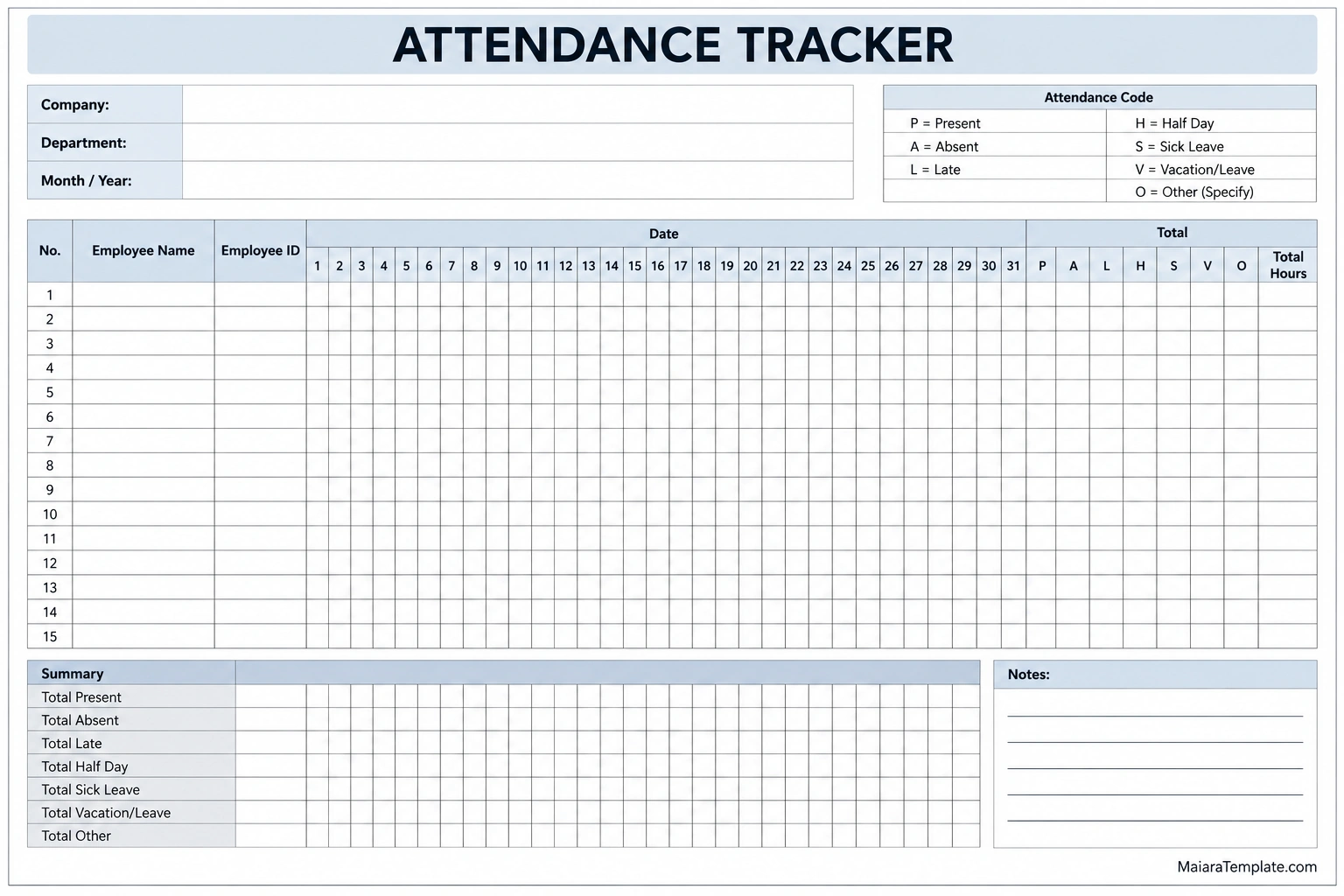
Free Printable Attendance Tracker Template
A printable attendance tracker template gives you a structured way to monitor attendance without building a worksheet from scratch. It can be useful for small businesses, departments, teams, training programs, and other groups that need a monthly overview.
The template below includes company and department details, a month and year field, employee name and ID columns, daily attendance columns, status codes, summary totals, total hours, and a notes section. You can print it and fill it in by hand or use the layout as a reference when creating a digital spreadsheet.
Why Is an Attendance Tracker Important?
Consistent attendance tracking helps organizations maintain clear records and understand how employees participate in scheduled work. It can also support planning, reporting, and communication between employees and managers.
1. Improves Record Accuracy
A standardized attendance tracker gives managers a consistent format for recording attendance. It reduces dependence on memory and makes it easier to review dates, correct errors, and locate historical information when needed.
2. Supports Payroll Administration
Attendance records can provide useful information for payroll, particularly when they include verified work hours, lateness, overtime, and approved leave. However, a simple attendance sheet may not capture every detail required to calculate wages accurately. Employers should follow their official timekeeping and payroll procedures.
3. Helps Monitor Productivity and Staffing
Attendance information can help managers understand staffing availability and identify recurring coverage gaps. When combined with workload and scheduling data, it can support decisions about shift planning, task allocation, and staffing levels.
4. Supports Workplace Policies
A consistent process helps organizations apply attendance policies more fairly. Clear records can support discussions about repeated lateness or absences, provided managers consider relevant policies, approved leave, and individual circumstances before drawing conclusions.
5. Helps Identify Attendance Patterns
Reviewing attendance over time may reveal recurring absences, frequent late arrivals, or periods when staffing is especially difficult. These patterns can prompt managers to investigate underlying causes and consider appropriate solutions.
What Should an Attendance Tracker Include?
The ideal attendance tracker contains enough information to meet your needs without making daily recording unnecessarily complicated. For a monthly employee attendance sheet, consider including the following fields.
- Company or department: Identifies the organization or team whose attendance is being recorded.
- Reporting period: Specifies the month, year, week, or dates covered by the tracker.
- Employee name: Identifies each person on the attendance list.
- Employee ID: Provides a consistent identifier when multiple employees have similar names.
- Daily attendance status: Records whether each employee was present, absent, late, on leave, or assigned another defined status.
- Clock-in and clock-out times: Captures work start and finish times when required.
- Hours worked: Records verified working time according to the organization’s procedures.
- Attendance totals: Summarizes the number of days or occurrences for each status.
- Notes: Provides space for brief administrative information when necessary.
- Reviewer or supervisor: Identifies the person responsible for checking or approving the record, if applicable.
Choose fields based on how the tracker will be used. A simple monthly attendance chart may be sufficient for monitoring presence, while payroll or regulatory reporting may require a more detailed timekeeping system.
Common Attendance Tracker Codes
Attendance codes make a tracker easier to scan and summarize. The key is to define each code clearly and use it consistently throughout the reporting period.
- P — Present: The individual attended as scheduled.
- A — Absent: The individual did not attend the scheduled workday or activity.
- L — Late: The individual arrived after the expected start time.
- H — Half day: The individual attended for only part of the scheduled day, where this category is appropriate.
- S — Sick leave: The absence was recorded under the organization’s sick-leave category.
- V — Vacation or approved leave: The individual was away under an applicable leave arrangement.
- O — Other: Another status defined by the organization.
These codes are examples, not universal standards. Adapt them to your workplace policies and applicable requirements. Make sure every person who records attendance understands what each code means.
How to Use an Attendance Tracker Effectively
A useful attendance tracking process depends on timely entries, consistent rules, and regular reviews. Follow these steps to maintain a reliable record.
Step 1: Choose the Right Tracking Format
Decide whether you need a daily, weekly, or monthly attendance tracker. A monthly worksheet works well for a stable team, while a sign-in sheet may be better for a one-time event. Organizations with rotating shifts or complex timekeeping needs may benefit from a digital system.
Step 2: Prepare the Employee List
Enter employee names and identification numbers before the reporting period begins. Check the list for duplicate entries and update it when team membership changes.
Step 3: Define Attendance Rules
Establish when attendance should be recorded, which codes should be used, and how late arrivals, approved leave, and corrections should be handled. Consistent rules help prevent different supervisors from interpreting the same situation differently.
Step 4: Record Attendance Promptly
Enter attendance at the agreed time rather than waiting until the end of the week or month. If the tracker includes working hours, record or verify the relevant time entries according to the organization’s timekeeping procedure.
Step 5: Review and Verify Entries
Check for missing entries, inconsistent codes, duplicate names, and incorrect totals. If attendance data is used for payroll or formal reporting, follow the required review and approval process before relying on the figures.
Step 6: Summarize and Store the Data
Calculate attendance totals where appropriate and store the completed tracker securely. Use a consistent filing system so authorized staff can locate records when they need them.
Attendance Tracker for Small Businesses
Small businesses often need a straightforward way to monitor attendance without investing in a complex workforce management system. A printable employee attendance tracker can provide a practical starting point for a team with predictable schedules.
Managers can use a monthly tracker to review absences, monitor late arrivals, plan staff coverage, and maintain a record for administrative follow-up. If employees work different shifts or variable hours, a simple daily attendance code may not be enough. Consider recording actual start and finish times or using a suitable timekeeping tool.
As the business grows, its needs may change. More employees, multiple locations, overtime rules, leave balances, and payroll integrations can make a spreadsheet harder to maintain. Review the process periodically to determine whether a digital attendance tracking system would improve accuracy and efficiency.
Printable Attendance Tracker vs. Digital Attendance Software
A printable attendance tracker is easy to distribute, requires no specialized software, and works well for small teams or locations where paper records are convenient. It is also useful when you want a visible monthly overview that can be completed manually.
A digital attendance tracker can automate calculations, sort records, create reports, and reduce repetitive data entry. Some systems also support shift scheduling, mobile clock-ins, leave management, and payroll integrations.
Neither format is best for every organization. Consider the number of employees, reporting requirements, available resources, and sensitivity of the data before choosing a method. If you transfer information from paper to a digital system, verify the entries to avoid introducing new errors.
Best Practices for Accurate Attendance Tracking
Follow these practices to make attendance records more consistent, useful, and reliable.
- Use standardized codes: Maintain a clear legend and apply the same definitions throughout the organization.
- Record information promptly: Timely entries reduce reliance on memory and help prevent missing details.
- Separate attendance from time worked: Presence alone does not always establish the exact number of hours worked or payable.
- Verify important totals: Check calculations before using attendance information for payroll or reporting.
- Protect employee information: Limit access to authorized personnel and store records securely.
- Correct mistakes transparently: Follow a documented process for changes so the record remains trustworthy.
- Apply policies consistently: Use the same procedures while accounting for approved leave and applicable employee rights.
- Review records regularly: Identify missing information and resolve discrepancies before they become difficult to investigate.
- Follow applicable requirements: Confirm recordkeeping, retention, working-time, and payroll obligations for your location and industry.
Frequently Asked Questions
What is the purpose of an attendance tracker?
An attendance tracker records and summarizes when individuals are present, absent, late, or on approved leave. In a workplace, it can support staffing decisions, attendance reviews, administrative reporting, and payroll processes when combined with accurate timekeeping data.
How do I create an employee attendance tracker?
Start with the reporting period and employee list, then add date columns and a clear attendance code system. Include hours worked or time-in and time-out fields if required. Review entries regularly and calculate totals only after verifying the data.
Can I use Excel as an attendance tracker?
Yes. Excel or another spreadsheet application can track employee names, dates, attendance codes, and summary totals. Formulas can automate counts, but the spreadsheet should be checked for incorrect ranges, missing entries, and inconsistent codes.
What is the difference between an attendance tracker and a time tracker?
An attendance tracker focuses on whether someone attended a scheduled day, shift, or activity. A time tracker records the duration of work or time spent on specific tasks. Some systems combine both functions, but attendance status alone does not necessarily establish hours worked.
Can an attendance tracker be used for payroll?
It can support payroll by documenting attendance and, in some formats, working hours. However, payroll may also require verified breaks, overtime, pay rules, approved leave, and manager approvals. Use the employer’s official payroll process to confirm the final figures.
How often should attendance records be updated?
Attendance should generally be recorded as close as practical to the time the activity occurs. The frequency of review depends on the workplace and the purpose of the tracker. Payroll-related records may need more frequent checks than a general monthly participation summary.
Is a printable attendance tracker suitable for a large company?
A printable tracker can work for a small team or a specific department, but managing many employees, shifts, and locations on paper can become difficult. A digital attendance system may be more practical when automated reports, access controls, and integration with payroll are needed.
Conclusion
An attendance tracker helps organizations record attendance consistently, monitor absences and lateness, and maintain information for planning and administration. When used with clear rules and regular verification, it can support better staffing decisions and more reliable records.
Use the free printable attendance tracker template from MaiaraTemplate.com to organize employee names, daily attendance, status totals, and notes in one place. Adapt the worksheet to your needs, protect employee information, and use a verified timekeeping process whenever the records affect payroll or formal compliance reporting.
Download: Attendance Tracker Template

- Attendance Tracker Template - October 15, 2026
- Free Printable Attendance Sheet Template - October 15, 2026
- Asset Purchase Agreement Template - October 15, 2026
