A Sprint Retrospective is a structured meeting where a Scrum team reflects on the work completed during the previous sprint. The team discusses what went well, what did not go as expected, and what can be improved in the next sprint. Rather than simply reviewing completed tasks, the retrospective focuses on how the team worked together and how its processes can become more effective.
A well-run sprint retrospective gives team members an opportunity to share observations, identify recurring problems, recognize successful practices, and agree on practical improvements. It is an important part of an inspect-and-adapt approach because the team can use what it learned from one sprint to make the next sprint more productive.
Using a Sprint Retrospective Template can make this discussion easier to organize. A structured worksheet gives the team clear areas for discussion and provides a place to record action items that can be followed up during the next sprint.
What Is a Sprint Retrospective?
A Sprint Retrospective is a Scrum event held near the end of a sprint. Its purpose is to give the Scrum Team an opportunity to inspect how the sprint went in terms of people, interactions, processes, tools, and working practices.
The discussion is not simply about whether the sprint goal was achieved. The team examines the way work was performed and looks for opportunities to improve quality, collaboration, efficiency, and effectiveness.
Typical retrospective questions include:
- What went well during the sprint?
- What problems or challenges did we encounter?
- What slowed the team down?
- What should we continue doing?
- What should we change?
- What can we try during the next sprint?
The goal is to turn reflection into useful improvement rather than simply discussing problems without taking action.
Why Is a Sprint Retrospective Important?
A retrospective creates dedicated time for the team to step away from day-to-day delivery and examine how it is working. Without this opportunity, recurring problems can easily become accepted as normal.
Identifies What Worked Well
Retrospectives are not only about problems. Teams should also identify practices that contributed to successful outcomes. A useful technique, communication practice, development workflow, or collaboration habit may be worth continuing in future sprints.
Recognizing successful practices helps prevent the team from focusing exclusively on weaknesses.
Reveals Problems and Obstacles
The retrospective provides a structured environment for discussing challenges that affected the sprint. These may include unclear requirements, interruptions, technical problems, dependencies, communication issues, inefficient processes, or workload concerns.
Identifying these issues is the first step toward deciding how they can be addressed.
Encourages Continuous Improvement
Agile teams aim to learn and adapt continuously. A retrospective creates a regular opportunity to select improvements rather than waiting until a major problem occurs.
Improves Team Collaboration
When team members can openly discuss their experiences, they can develop a better understanding of how different working practices affect the group. Constructive conversations can also help the team identify ways to communicate and collaborate more effectively.
Supports Better Quality
Retrospective discussions can uncover process problems that contribute to defects, rework, missed requirements, delays, or other quality issues. Addressing those process problems can support better outcomes in future sprints.
When Should a Sprint Retrospective Be Held?
The Sprint Retrospective takes place near the end of the sprint, after the Sprint Review and before the next sprint begins. In Scrum, it is one of the formal events within the sprint cycle.
The exact timing and duration can depend on the sprint length and the team’s working arrangements. The important point is that the team has dedicated time to inspect its way of working and identify improvements before moving forward.
Who Participates in a Sprint Retrospective?
The Sprint Retrospective is intended for the Scrum Team. This generally includes the Developers, Product Owner, and Scrum Master.
Participation should create an environment where team members can contribute observations and ideas. The Scrum Master can help facilitate the discussion and support an effective retrospective process.
The format can vary depending on the team’s needs, but everyone should have an opportunity to contribute meaningfully to the conversation.
What Should Be Discussed in a Sprint Retrospective?
A useful retrospective usually covers several areas rather than focusing on only one aspect of the sprint.
What Went Well?
This section gives the team an opportunity to identify successful practices, positive experiences, and accomplishments from the sprint.
Examples may include:
- Effective collaboration between team members
- Clear communication with stakeholders
- A successful development practice
- Fewer defects than previous sprints
- Useful automation or tooling
- Successful handling of a difficult technical problem
What Did Not Go Well?
The team can then discuss problems, blockers, frustrations, delays, or practices that created unnecessary difficulty.
The purpose is not to assign blame. The discussion should focus on understanding what happened and identifying factors that the team can improve.
What Can We Improve?
Once problems have been identified, the team can discuss possible improvements. Not every issue needs an immediate solution, so the team should consider which changes are realistic and useful for the next sprint.
What Actions Should We Take?
A retrospective becomes more useful when discussion leads to specific action items. Each action should be clear enough that the team can determine whether it was completed.
For example, instead of writing “improve communication,” an action item could specify a particular change to the team’s communication process.
How to Run an Effective Sprint Retrospective
A simple structure can help keep the retrospective focused while still giving everyone enough time to participate.
Prepare the Retrospective
Before the meeting, gather relevant information from the sprint. This may include completed work, unresolved issues, production incidents, team feedback, or other observations that can help stimulate discussion.
Choose a retrospective format that suits the team’s current needs and prepare a shared board, worksheet, or Sprint Retrospective Template.
Set the Stage
Begin by explaining the purpose of the meeting and establishing a constructive tone. Participants should understand that the objective is to learn and improve rather than blame individuals.
Gather Observations
Ask team members to independently identify things that went well and things that created difficulties. Giving participants time to think before discussion can help prevent the conversation from being dominated by the first few people who speak.
Discuss the Findings
Review the observations together. Look for patterns, recurring problems, relationships between different issues, and practices that the team wants to continue.
Select Improvement Actions
Choose a manageable number of improvements to work on during the next sprint. Assign an owner when appropriate and define what successful completion will look like.
Close the Meeting
Summarize the key findings and agreed actions. The team should leave the retrospective with a clear understanding of what it intends to improve.
Using a Sprint Retrospective Template
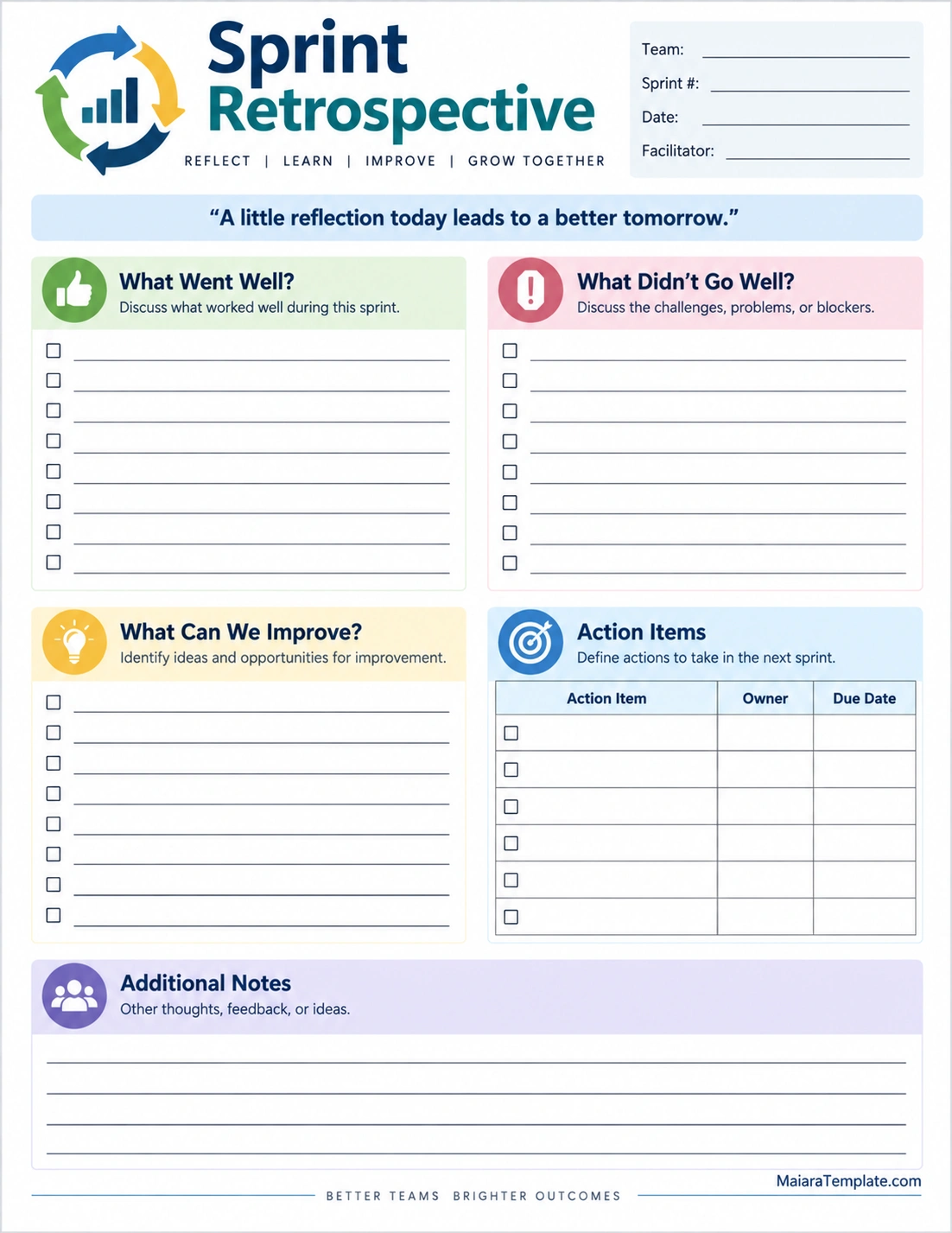
A Sprint Retrospective Template provides a consistent structure for recording feedback and improvement ideas. It can be particularly useful for teams that want a straightforward format for recurring retrospective meetings.
A printable template can include sections such as:
- Team and sprint information
- What went well
- What did not go well
- What can be improved
- Action items
- Action owners
- Due dates
- Additional notes
Using the same basic template from sprint to sprint can also make it easier to compare recurring themes and determine whether previously identified improvements are being addressed.
How to Create Useful Retrospective Action Items
One of the most important parts of a retrospective is turning discussion into action. A long list of vague improvements can be difficult to implement.
Make Actions Specific
Describe exactly what the team intends to change. Avoid broad statements that do not provide clear direction.
Keep the Number Manageable
It may be tempting to create an action item for every problem discussed. However, selecting a smaller number of meaningful improvements can make follow-through easier.
Assign Responsibility
When appropriate, identify a person or role responsible for helping move an action forward. Ownership does not necessarily mean that one person must complete everything; it means there is someone responsible for ensuring the action is addressed.
Define a Time Frame
If an improvement needs to happen during the next sprint, record an appropriate target date or milestone. This makes follow-up easier.
Common Sprint Retrospective Formats
There are many ways to structure a retrospective. Teams can choose a format based on their experience, current challenges, and the type of conversation they need.
What Went Well, What Did Not, and What Can Improve
This straightforward format divides the discussion into three familiar categories. It works well when the team wants a simple structure without complicated activities.
Start, Stop, Continue
The team identifies practices it would like to start doing, stop doing, and continue doing. This format focuses directly on behavioral and process changes.
Mad, Sad, Glad
Team members identify experiences that made them frustrated, disappointed, or positive about the sprint. This can help surface emotional and interpersonal aspects of the team’s experience while keeping the conversation structured.
4Ls Retrospective
The 4Ls format asks participants to consider what they liked, learned, lacked, and longed for during the sprint. It can encourage a broader reflection beyond simply listing problems.
Common Sprint Retrospective Mistakes
Even when a team holds retrospectives regularly, the meetings may become less useful if certain problems are allowed to continue.
- Focusing entirely on negative issues
- Blaming individuals for problems
- Allowing only a few people to speak
- Creating too many action items
- Recording vague improvement ideas
- Failing to follow up on previous actions
- Repeating the same discussion without changing the process
- Turning the retrospective into a status meeting
A retrospective should create space for honest reflection while maintaining a constructive focus on improvement.
How to Make Retrospectives More Effective
Retrospectives can become more valuable when teams continuously improve the retrospective itself.
Rotate activities occasionally to keep discussions fresh. Encourage everyone to contribute before opening the floor for group discussion. Use data and specific examples when available instead of relying entirely on general impressions.
Most importantly, revisit previous action items. If the team repeatedly identifies the same problem without taking meaningful action, the retrospective is not achieving its full purpose.
Benefits of a Printable Sprint Retrospective Worksheet
A printable Sprint Retrospective worksheet can be useful for teams that prefer a simple visual format. A physical worksheet can be placed in a meeting area, completed individually, or used as a guide during a facilitated discussion.
The structured sections make it easier to separate observations from action items. It also provides a tangible record that can be reviewed after the meeting, provided the team’s information-handling practices allow for it.
For remote teams, the same structure can be recreated in a digital collaboration tool.
Final Thoughts on Sprint Retrospectives
A Sprint Retrospective gives a Scrum Team dedicated time to reflect on how the previous sprint went and decide how to work more effectively in the future. By discussing successful practices, challenges, improvement opportunities, and concrete actions, the team can turn experience into practical learning.
The most useful retrospective is not necessarily the longest or most elaborate. It is one that creates an open discussion, identifies meaningful opportunities for improvement, and results in realistic actions that the team can actually follow through on.
A Sprint Retrospective Template can provide a simple structure for organizing these conversations. Whether used as a printable worksheet or adapted for a digital workspace, a consistent format can help teams reflect, learn, and continuously improve from one sprint to the next.
Download: Sprint Retrospective Template

- Printable Weekly Cleaning Schedule Template - September 17, 2026
- Free Printable Travel Budget Template - September 17, 2026
- Printable Weekly Lesson Planner Template - September 17, 2026
