An address label provides clear mailing information to help letters, packages, and other shipments reach the correct destination. It typically displays the recipient’s name and address, while a return address helps identify the sender if a shipment cannot be delivered.
Address labels are useful for personal correspondence, online orders, business shipments, invitations, office mail, and organizing personal belongings. They make addresses easier to read and help reduce mistakes caused by handwriting, incomplete details, or inconsistent formatting.
Using an address label template can save time and create a consistent appearance across multiple shipments. Whether you need a simple mailing label or a decorative design for personal use, the right layout makes it easier to prepare accurate, professional-looking labels.
What Is an Address Label?
An address label is a printed or handwritten label that displays information used to identify a recipient, sender, or destination. It is commonly attached to envelopes, parcels, shipping boxes, folders, and personal belongings.
A standard mailing address label usually includes the recipient’s full name, street address, city, state or province, postal code, and country when applicable. A return address label contains the sender’s corresponding information.
Businesses may also use address labels for order fulfillment, inventory handling, customer correspondence, and shipping operations. Depending on the purpose, a label may include a company name, department, barcode, tracking identifier, or other relevant details.
The main purpose of an address label is to present destination information clearly and consistently. Correct information and readable printing help postal and courier services process shipments more efficiently.
Why Are Address Labels Important?
Address labels do more than display an address. They help organize mail, support efficient shipping, and create a consistent presentation for personal and business correspondence.
Improve Delivery Accuracy
Clearly printed addresses are easier to read than unclear handwriting. Proper formatting helps reduce the risk of errors when identifying recipients and destinations.
Save Time During Shipping
Printing labels from a saved template or customer database can be faster than writing each address manually. This is particularly helpful for businesses that prepare many orders each day.
Make Packages Look Professional
A clean, consistent address label creates a more organized appearance. Businesses can include their return address and brand identity while keeping the recipient’s delivery information easy to find.
Simplify Repeated Mailing Tasks
People who regularly send invitations, documents, or packages can save frequently used addresses in a document or contact system. This reduces repetitive data entry and makes future shipments easier to prepare.
Help Identify Personal Belongings
Address labels can also identify luggage, storage containers, school supplies, folders, and other personal items. The information should match the purpose of the label and avoid unnecessary disclosure of sensitive details.
Printable Address Label Template
A printable address label template provides a ready-made design for creating neat, consistent labels. It can be used for envelopes, parcels, business mail, invitations, and selected personal items.
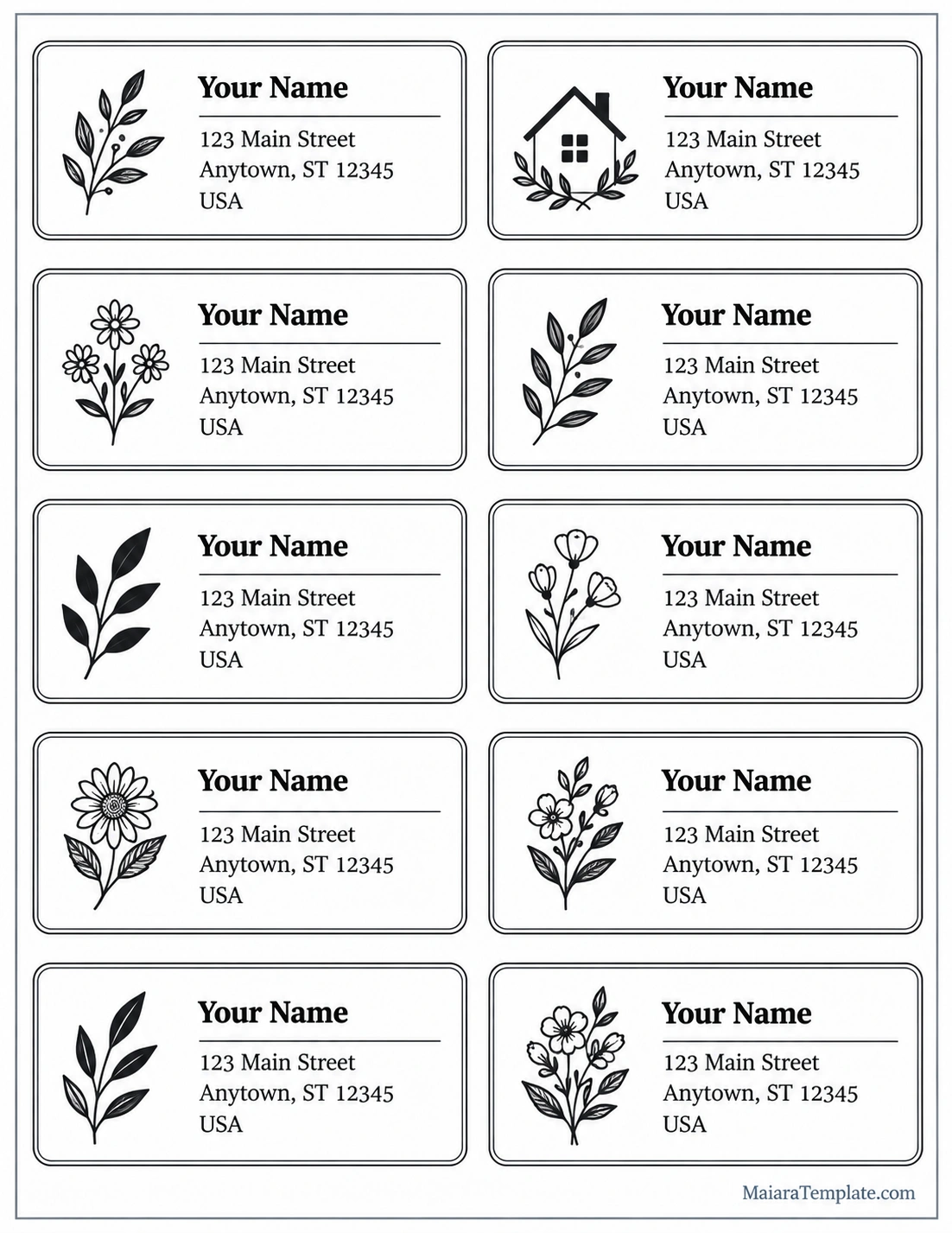
The printable design features multiple address labels arranged in a two-column layout. Each label includes space for a name and mailing address, along with a decorative botanical or house-themed illustration.
You can replace the sample details with your own information and print the labels on suitable paper or compatible label sheets. Before printing a full batch, test the layout on ordinary paper to confirm that the dimensions and alignment match your intended use.
What Information Should an Address Label Include?
The correct information depends on the type of label and the destination. For standard mailing purposes, include the details needed to identify the recipient and deliver the shipment accurately.
Recipient’s Full Name
Write the recipient’s name clearly. For business deliveries, include the company name and the relevant department or contact person when necessary.
Street Address
Include the building number, street name, and any required apartment, suite, unit, or floor number. Missing unit information can make an otherwise correct address difficult to deliver.
City, State, and Postal Code
Use the correct city, state or province, and postal code. Check the formatting conventions used by the destination country’s postal service.
Country for International Mail
For international shipments, include the destination country in a clearly identifiable format. Follow the postal service’s current guidance for international address layouts.
Return Address
A return address identifies the sender and provides a destination for undeliverable mail when return service is available. Place it where the postal service or courier recommends for the chosen shipping method.
Shipping or Tracking Information
Some business labels include a barcode, tracking number, order number, or routing information. These elements should be added only when required by the shipping service or fulfillment process.
How to Create an Address Label Step by Step
Creating an address label is straightforward when you prepare the information and check the design before printing.
Choose the Right Label Format
Decide whether you need a standard mailing label, a return address label, a decorative label, or a shipping label. Choose a layout that provides enough space for all required information.
Prepare the Address Details
Gather the recipient’s name, street address, city, region, postal code, and country when needed. Verify the spelling and address details before adding them to the template.
Select a Suitable Template
Choose a printable address label template that matches your paper or label-sheet dimensions. If you are using pre-cut adhesive labels, check the product specifications before adjusting margins or spacing.
Customize the Design
Add the address information using a readable font and suitable text size. Keep decorative elements away from important delivery details and leave enough space around the text.
Preview and Test Print
Preview the document before printing. Print a test page on ordinary paper to check alignment, spacing, and readability. Compare it with your label sheet before using adhesive stock.
Apply the Label Securely
Place the label on a flat, visible surface. Make sure it is firmly attached and does not cover required shipping information, barcodes, seams, or package closures.
Common Types of Address Labels
Address labels come in different formats for personal mailing, business operations, and organizational purposes. Choosing the right type helps ensure that the label suits its intended use.
Mailing Address Labels
Mailing address labels display the recipient’s delivery details on envelopes, letters, and parcels. They are useful for personal correspondence, invitations, and routine office mail.
Return Address Labels
Return address labels display the sender’s name and address. They are convenient for people and businesses that send mail frequently because the same information can be reused.
Shipping Address Labels
Shipping labels may contain the recipient’s address alongside barcodes, tracking numbers, service information, or routing details. These labels should follow the carrier’s specifications rather than relying on a generic decorative design alone.
Business Address Labels
Businesses use address labels for invoices, customer correspondence, product shipments, and administrative mail. A consistent design can support a professional brand image while maintaining readable delivery information.
Decorative Address Labels
Decorative labels may feature borders, botanical illustrations, seasonal designs, or other visual elements. They are popular for invitations, greeting cards, gifts, and personal correspondence.
Personal Item Labels
Labels can help identify luggage, storage boxes, folders, and other belongings. Consider using only the information needed for identification, especially when items will be visible in public places.
Address Label vs. Shipping Label
An address label and a shipping label are related, but they are not always interchangeable.
- Address label: Primarily displays a recipient’s or sender’s address. It may be decorative or designed for general mailing purposes.
- Shipping label: Often includes the destination address and carrier-specific information, such as a barcode, tracking number, service type, or routing data.
A decorative address label may be suitable for an envelope or gift package, but it should not replace a carrier-generated shipping label when the service requires specific barcodes or routing details.
Tips for Designing Effective Address Labels
A good address label balances readability, accurate information, and an appropriate layout. Follow these practical tips to create labels that work well.
- Use readable typography: Choose a clear font and a text size that remains legible when printed.
- Verify every address: Check spelling, street numbers, unit numbers, and postal codes before printing.
- Keep the layout simple: Avoid unnecessary graphics that compete with the address.
- Allow sufficient spacing: Leave clear margins around the text and label edges.
- Match the label dimensions: Confirm the template aligns with your paper or adhesive label sheets.
- Choose suitable materials: Use label stock that works with your printer and intended shipping conditions.
- Protect delivery information: Avoid placing labels across package seams or areas that may become damaged.
- Limit personal information: Include only the details needed for delivery or identification.
Common Address Label Mistakes to Avoid
Small errors can affect readability and delivery accuracy. Check for these common problems before sending your mail or packages.
- Incorrect postal codes: Verify the postal code against a reliable address source.
- Missing apartment or unit numbers: Include all necessary secondary address details.
- Text that is too small: Make sure the complete address is easy to read.
- Poor print alignment: Test the template before printing on pre-cut label sheets.
- Low-quality printing: Check that the text and barcodes, if present, are sharp and clear.
- Unsecured labels: Use suitable adhesive materials and apply them to a clean, flat surface.
- Using a decorative label for carrier routing: Use the shipping service’s required label format when necessary.
Frequently Asked Questions About Address Labels
What is an address label used for?
An address label displays recipient or sender information on mail, packages, and selected personal belongings. It helps identify the correct destination and makes address details easier to read.
What should be included on an address label?
A standard mailing address label usually includes the recipient’s name, street address, city, state or province, postal code, and country when required. A return address may also be included.
Can I print my own address labels?
Yes. You can create address labels using a printable template, a word processor, or compatible label-design software. Check your printer and label-sheet specifications before printing.
What is the difference between an address label and a return address label?
An address label commonly displays the recipient’s destination details, while a return address label displays the sender’s information. Both can be used on the same shipment when appropriate.
Can I use decorative address labels on packages?
Yes, decorative labels can be used when the address remains clear and the design does not interfere with required shipping information. Follow the carrier’s rules for shipping labels and barcodes.
How do I print address labels without alignment problems?
Choose a template that matches the label-sheet dimensions, confirm the printer settings, and test the layout on ordinary paper first. Avoid changing margins or scaling unless you have checked how those adjustments affect alignment.
Are address labels suitable for business use?
Yes. Businesses use address labels to prepare customer mail, fulfill orders, identify shipments, and maintain consistent presentation. High-volume operations may benefit from integrating label printing with an order management or shipping system.
Should I include my phone number on an address label?
Only include a phone number when it is required or useful for the delivery process. Avoid displaying unnecessary personal information on packages that may be handled by multiple people.
Conclusion
An address label is a simple but valuable tool for presenting delivery information clearly and consistently. It helps identify recipients, supports efficient mail handling, and can make personal correspondence and business shipments look more professional.
Using an address label template saves time and makes it easier to prepare multiple labels with a consistent layout. Choose the correct format, verify the address details, use readable typography, and test the print alignment before producing a full batch.
Whether you are mailing a letter, shipping customer orders, preparing invitations, or identifying personal belongings, a well-designed address label helps keep important information organized and easy to understand.
Download: Address Label Template

- Affirmative Action Plan Template - October 11, 2026
- Free Printable Affidavit Form Template - October 11, 2026
- Free Printable Address Label Template - October 11, 2026
