A Shipping Label is an essential document attached to a package to help ensure that a shipment reaches the correct destination. It contains important information such as the sender’s address, recipient’s address, tracking number, shipping method, and other details needed to identify and route the package. Whether you are shipping a single personal parcel or managing orders for an online business, an accurate label helps make the delivery process more organized and efficient.
A properly prepared shipping label does more than display an address. It provides information that carriers and other parties in the delivery process use to identify, sort, track, and handle a shipment. A missing apartment number, incorrect ZIP Code, unreadable address, or inaccurate tracking information can create unnecessary delays. Learning what belongs on a shipping label can help you prepare packages more carefully and reduce common shipping problems.
What Is a Shipping Label?
A Shipping Label is a printed label containing information used to identify and deliver a package. It is normally attached to the outside of a parcel where the carrier can easily scan and read it.
Depending on the carrier and type of shipment, a shipping label may contain the sender’s information, recipient’s information, tracking number, barcode, shipping service, package weight, handling instructions, and other shipment details.
Commercial shipping labels are often generated through a carrier’s shipping system or an online shipping platform. A printable shipping label template, however, can be useful for organizing addresses, preparing package information, or creating labels for situations where a formal carrier-generated label is not required.
Why Is a Shipping Label Important?
Every package needs clear identification so it can move through the delivery process efficiently. A shipping label provides much of the information needed to connect a physical package with its intended destination and shipment record.
Helps Route Packages
Carriers process large numbers of parcels every day. Address information and machine-readable codes help packages move through sorting facilities and transportation networks.
Provides Tracking Information
A tracking number allows a shipment to be associated with a record in the carrier’s system. Depending on the service, tracking information can provide updates about acceptance, transportation, delivery attempts, and final delivery.
Identifies the Sender and Recipient
Clear sender and recipient information helps distinguish one shipment from another. The sender’s address can also provide a return destination if the carrier cannot deliver the package.
Communicates Shipping Requirements
Some labels include information about the selected shipping service or special handling instructions. These details can help communicate how a shipment should be processed.
What Information Should Be on a Shipping Label?
The exact requirements vary depending on the carrier, service, package, and destination. However, several pieces of information are commonly associated with a standard shipping label.
- Sender information: The name and address of the person or business sending the package.
- Recipient information: The recipient’s name and complete delivery address.
- Shipping date: The date the package is scheduled to be shipped or handed to the carrier.
- Package weight: The weight of the shipment when required.
- Shipping method: The selected service, such as standard, expedited, or overnight shipping.
- Tracking number: The unique identifier associated with the shipment.
- Barcode: A machine-readable representation of shipment information when supplied by the carrier.
- Handling instructions: Additional information such as special handling notices when applicable.
Not every shipment requires every field to appear on a manually prepared label. When using a carrier-generated label, follow the carrier’s specific format and requirements.
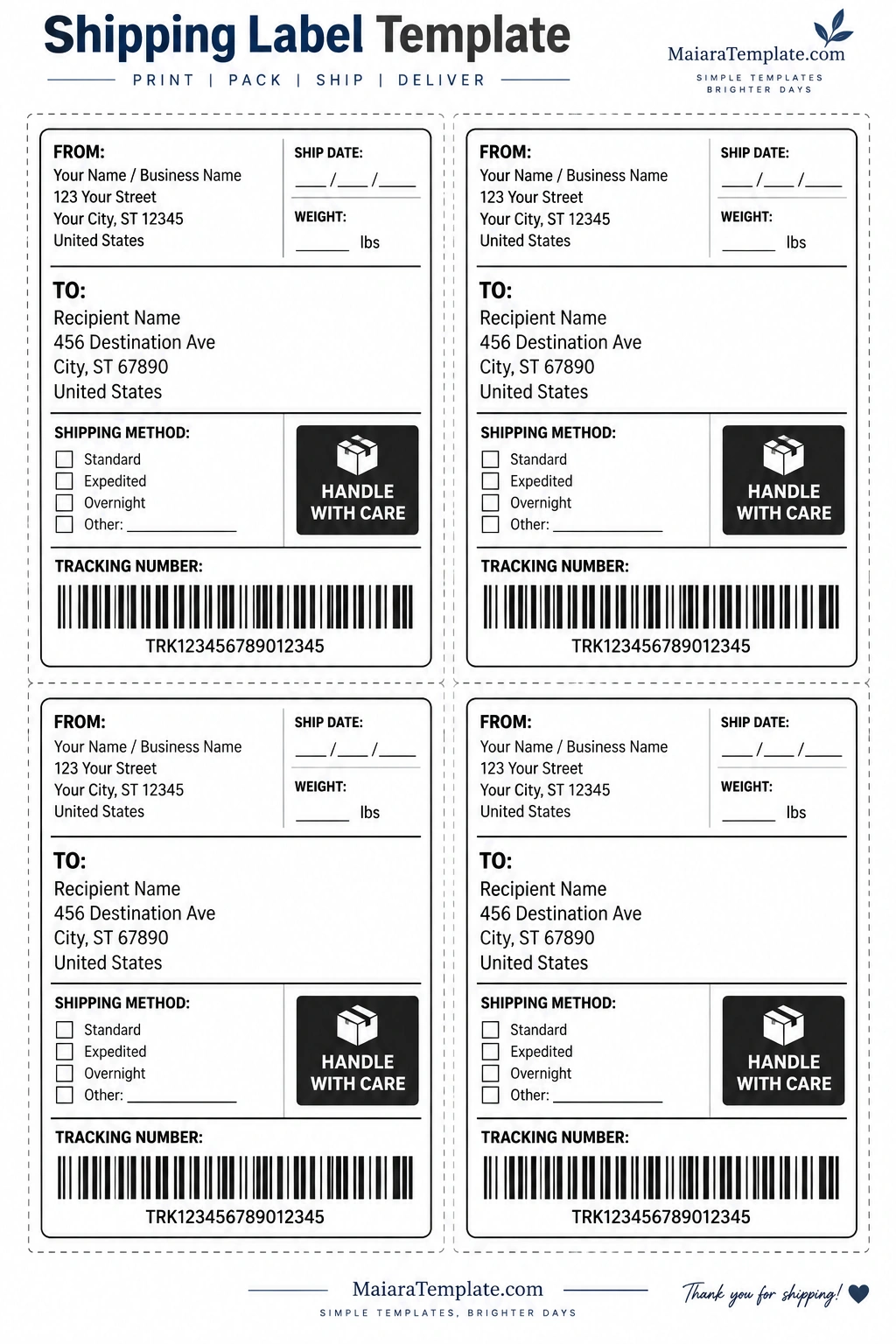
Sender Information on a Shipping Label
The sender section identifies the person or business shipping the package. Include a complete and accurate return address whenever appropriate.
A typical sender section may contain:
- Name or business name
- Street address
- Apartment, suite, or unit number when applicable
- City
- State
- ZIP Code
- Country for international shipments
Business shippers may also include a department name, order reference, or other internal information when useful.
Recipient Information on a Shipping Label
The recipient’s address is one of the most important parts of the label. Enter the information exactly as needed for delivery and double-check every detail before attaching the label.
A complete domestic address may include the recipient’s name, street address, apartment or unit number, city, state, and ZIP Code. For international shipments, additional destination information may be required depending on the carrier and destination country.
Be particularly careful with apartment numbers, building numbers, ZIP Codes, and similar details. A small address error can result in a delivery delay or failed delivery attempt.
Understanding Tracking Numbers and Barcodes
A tracking number is a unique identifier assigned to a shipment. It allows the package to be associated with its shipment record and can be used to check delivery updates through the carrier’s tracking system.
Many carrier-generated labels also contain a barcode that can be scanned during different stages of transportation. The barcode helps automate package identification and reduces the need for employees to manually enter shipment information.
If you are creating a personal or organizational shipping label, do not invent a tracking number and expect it to work as carrier tracking. A valid tracking number generally needs to be generated through the appropriate carrier or shipping service.
Shipping Methods to Include
The shipping method identifies the service selected for transporting the package. The available options depend on the carrier and shipment.
Common service descriptions may include:
- Standard shipping
- Expedited shipping
- Priority shipping
- Overnight shipping
- Local delivery
- Other specialized services
When a carrier generates the official label, use the service information supplied by that carrier rather than manually changing it.
How to Create a Shipping Label
Creating a shipping label can be simple when you have all the required shipment information available.
Step 1: Collect the Address Information
Gather the complete sender and recipient details before preparing the label. Check spelling, street numbers, unit numbers, city names, states, and ZIP Codes.
Step 2: Determine the Shipping Service
Choose the appropriate shipping method based on delivery requirements, package characteristics, destination, and available carrier services.
Step 3: Enter Package Information
Record the package weight and any other information required by the selected carrier or service.
Step 4: Generate the Official Label
For carrier-based shipments, use the carrier’s shipping system or an authorized shipping platform to generate the actual shipping label. This is especially important when postage, tracking, or barcode information is required.
Step 5: Print and Attach the Label
Print the label clearly and attach it securely to a flat surface of the package. Make sure the label is not folded over an edge and that important barcodes remain unobstructed.
How to Use a Printable Shipping Label Template
A Shipping Label Template can provide a convenient layout for organizing shipment information before printing or preparing a package. It can be particularly useful for small businesses, home offices, craft sellers, and individuals who need a consistent labeling format.
Start by entering the sender’s information and then add the complete recipient address. Add the shipping date, package weight, shipping method, tracking information, and any applicable handling notes.
Before printing, carefully review the entire label. Make sure the text is readable and that the recipient’s address is complete. If the shipment requires a carrier-generated barcode, postage, or tracking number, use the official carrier-generated label rather than relying on a generic template.
Shipping Label Placement Tips
Correct placement can help prevent the label from becoming damaged or difficult to scan.
- Place the label on a relatively flat surface.
- Keep the label visible and easy to read.
- Do not cover important information with tape, additional labels, or packaging materials.
- Avoid placing barcodes across package edges or seams.
- Remove or cover old shipping labels when reusing a box.
- Make sure the label is firmly attached.
- Use a clear print quality that makes text and barcodes easy to read.
If you use clear packing tape over a label, avoid creating glare or wrinkles that could interfere with scanning. Follow your carrier’s packaging and labeling instructions for the specific shipment.
Common Shipping Label Mistakes
Many shipping problems can be traced back to incomplete or inaccurate information. Reviewing the label before handing over the package can prevent avoidable errors.
Incorrect Address
A wrong street number, ZIP Code, city, or unit number can interfere with delivery. Always compare the label against the recipient’s confirmed address.
Unreadable Printing
Small text, low-quality printing, or damaged labels can make information difficult to read. Use a clear printer setting and appropriate label material.
Damaged Barcode
A barcode needs to remain readable if the carrier relies on it for automated scanning. Avoid folding, tearing, or obscuring barcode areas.
Old Labels on Reused Boxes
When reusing packaging, remove or completely cover previous addresses and barcodes. Leaving old shipping information visible can create confusion during handling.
Missing Apartment or Unit Number
For multi-unit buildings, omitting an apartment, suite, or unit number can make successful delivery more difficult. Verify these details before printing.
Shipping Labels for Small Businesses
For an online store or small business, consistent shipping labels can make the fulfillment process more organized. A standard layout can help employees or business owners locate important information quickly.
Businesses may also use shipping labels alongside order numbers, packing slips, inventory systems, and customer records. However, the information printed on the official carrier label should always match the actual shipment.
For businesses that process many orders, automated shipping software can reduce repetitive data entry and help connect orders with shipping records.
Shipping Labels for Personal Packages
Individuals may need shipping labels when sending gifts, returning products, mailing documents, or moving personal belongings. The basic principles remain the same: use accurate address information, choose the appropriate service, and make sure the package is clearly labeled.
A printable label template can be useful when you need to organize information before purchasing postage or generating a formal carrier label.
Digital vs. Printable Shipping Labels
Modern shipping workflows often combine digital and printed information. A shipping platform may generate a digital label containing postage, tracking information, and a barcode. The label can then be printed and attached to the physical package.
A printable worksheet or template serves a slightly different purpose. It can help organize shipment information and provide a consistent physical format, but it should not be confused with an official postage label unless it was generated through an authorized shipping system.
Shipping Label Checklist
Before sending a package, use a quick checklist to verify the most important details.
- Confirm the recipient’s full name.
- Verify the complete delivery address.
- Check the city, state, and ZIP Code.
- Include the apartment, suite, or unit number when applicable.
- Confirm the sender’s return address.
- Verify the selected shipping service.
- Check the package weight when required.
- Confirm the tracking number.
- Make sure barcodes are clear and unobstructed.
- Remove or cover old labels from reused packaging.
- Attach the label securely to the package.
Final Thoughts
A Shipping Label provides essential information that helps identify, route, track, and manage a package throughout its delivery journey. Accurate sender and recipient details, clear shipping information, and readable tracking elements can make the shipping process more organized and help reduce preventable delivery issues.
Whether you are preparing one personal package or managing shipments for a small business, taking a few moments to review the label can make a significant difference. A printable shipping label template can help organize the information, while official carrier-generated labels should be used whenever postage, tracking, or carrier-specific barcodes are required.
The most important principle is simple: make the information accurate, complete, readable, and appropriate for the shipping service being used. A carefully prepared label helps connect the package with the right destination and supports a smoother delivery process from sender to recipient.
Shipping Label Template – Download

- Free Printable Time Log Template - September 17, 2026
- Free Printable Shipping Label Template - September 17, 2026
- Thank You Letter Template for a Job Offer - September 17, 2026
